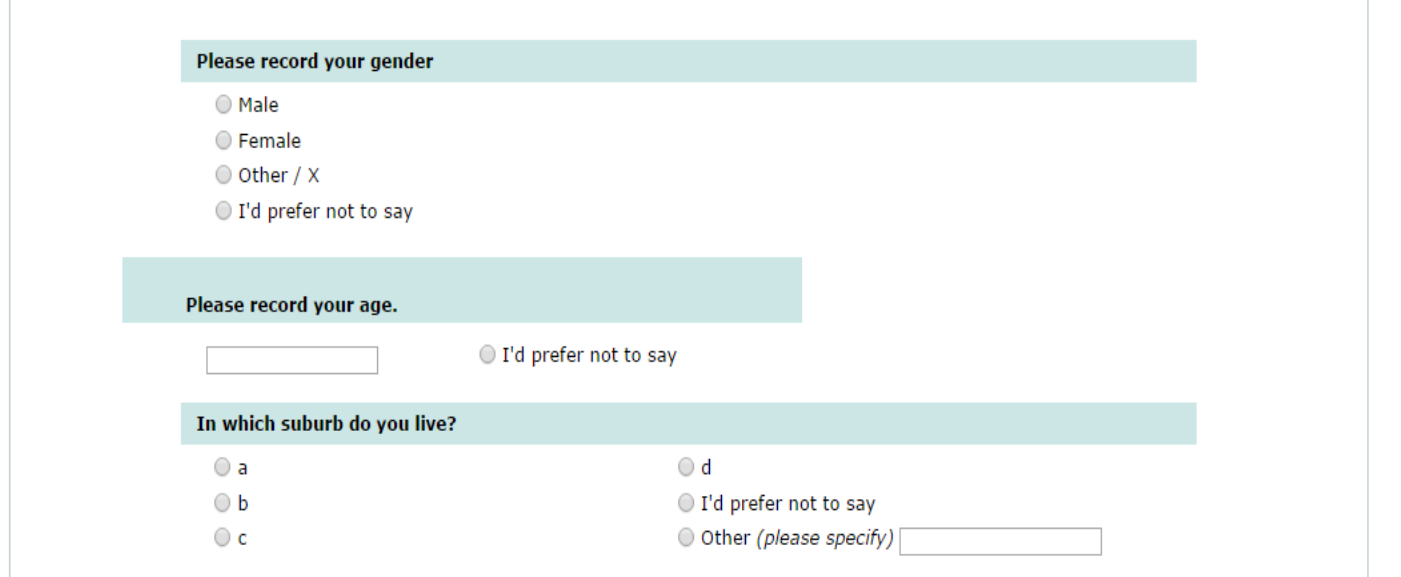
I'm not sure I would use that workaround in this case. You don't really need an "array" here. I would simply use JavaScript or CSS to move the radio into the text question or vice-versa. There are many examples of this in previous posts.
Having said that, I question the survey design. The respondent will not be able to de-select the age radio once clicked. I would just leave the age question non-mandatory.
.
Cheers,
Tony Partner Solutions, code and workarounds presented in these forums are given without any warranty, implied or otherwise.
Thank you for your reply. I have spent the last 45 minutes trying to find a post that explains how to move the radio question into the text question but have been unable to find one. Could you please point me in the right direction?
Also, I agree that it would be better to be able to set the question so that the respondent can de-select the radio button so I will change it to a multiple response question type. The age box itself is not mandatory, but I need the radio to trigger the age category list if they don't want to give their age in years (we need to ask for the year as there are a range of stakeholders who use the results, and each stakeholder needs different ranges to align with their planning, for instance one department uses 18-25 whilst another uses 30-34. The range is there is a last resort so that we at least have something).
switch the "I'd prefer not to say" radio question to check-box type
place relevance (conditions) on the numeric question to only show it if the check-box IS NOT checked
place relevance (conditions) on the age category question to only show it if the check-box IS checked
manipulate the text-display, numeric and check-box questions with CSS to make them appear as one
For portability, in the attached sample survey, I have used JavaScript in the source of the text-display question (Q2) to insert the CSS. You could, of course, also do this in template.css. (note that these styles are for the default template)