I don't think that that very old workaround will work for what you are doing. It is designed to manipulate all elements in a block (question or array row)
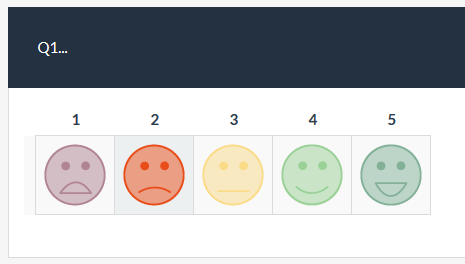
I would be inclined to use pure CSS with pseudo-elements to accomplish it. (much like the radios in version 2.6x)
Something like the CSS below which:
- applies to an array question with a CSS class "
with-smileys"
- applies to an array question with answer codes "
A1, A2, A3, A4, A5"
- is written for 62x62 pixel images
- uses opacity for "hover" and "checked" effects.
Note that this is just a quick example that would need to be modified for responsiveness.
Code:
.array-flexible-row.with-smileys table.subquestion-list,
.array-flexible-row.with-smileys col.col-visible {
width: auto !important;
}
.array-flexible-row.with-smileys table.array-no-dropdown td.answer-item.text-center {
padding: 0;
border: 1px solid #DBDBDB
}
.array-flexible-row.with-smileys .radio label {
display: block;
width: 78px;
height: 78px;
padding: 0;
background: transparent 0 0 no-repeat;
}
.array-flexible-row.with-smileys .radio input[type="radio"]:checked + label {
background: #ECF0F1;
}
.array-flexible-row.with-smileys .radio label::before {
border: 0 none;
border-radius: 0;
content: "";
display: inline-block;
height: 62px;
width: 62px;
left: 50%;
top: 8px;
margin-left: -31px;
position: absolute;
background: transparent 0 0 no-repeat;
opacity: 0.5;
filter: alpha(opacity=50);
}
.array-flexible-row.with-smileys .radio.answer_cell_A1 label::before { background-image: url(../images/smiley_1_62x62.png); }
.array-flexible-row.with-smileys .radio.answer_cell_A2 label::before { background-image: url(../images/smiley_2_62x62.png); }
.array-flexible-row.with-smileys .radio.answer_cell_A3 label::before { background-image: url(../images/smiley_3_62x62.png); }
.array-flexible-row.with-smileys .radio.answer_cell_A4 label::before { background-image: url(../images/smiley_4_62x62.png); }
.array-flexible-row.with-smileys .radio.answer_cell_A5 label::before { background-image: url(../images/smiley_5_62x62.png); }
.array-flexible-row.with-smileys .radio input[type="radio"]:hover + label::before {
opacity: 0.65;
filter: alpha(opacity=65);
}
.array-flexible-row.with-smileys .radio input[type="radio"]:checked + label::before {
opacity: 1;
filter: alpha(opacity=100);
}
.array-flexible-row.with-smileys .radio input[type="radio"]:focus + label::before {
outline: none;
}
.array-flexible-row.with-smileys .radio label::after {
display: none;
}


 Topic Author