Hello,
I am using version 2.05 build 150310. What I'm trying to achieve is a 3-column table question, where in each row:
- first column containts some statement, ie. "I like dogs"
- second column has choice selection (radio), only 2 options
- third columns contains some other statement ie. "I prefer cats"
(in each row, respondent has to select the statement with which they agree more)
Ideally it should look like this:
Statement 1a ○ ○ Statement 1b
Statement 2a ○ ○ Statement 2b
Statement 3a ○ ○ Statement 3b
Statement Na ○ ○ Statement Nb
Of course, I could go just for series of normal single choice questions, but I specifically want to make it fit in a table (series of rows in fact), to make the filling of the survey less painful for the respondents (I am planning to add lots of statements)
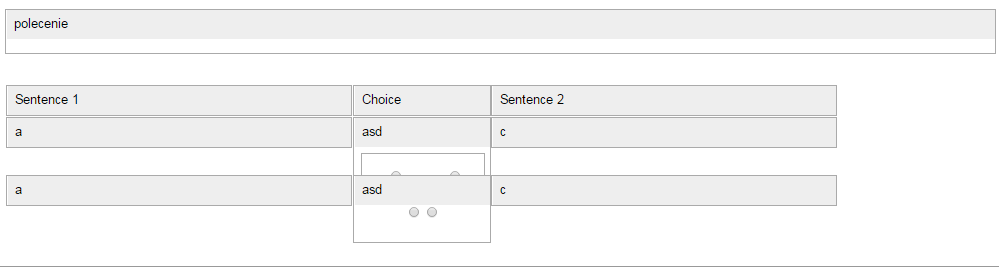
I have read the workaround section in the manual and used the "Multiple question types in array" workaround to achieve something which is close (see attachment and code below), but I have problem hiding the gray question field in the second column, so that I just display the radio selection, between the statements.
Do you have an idea how I could achieve that? Or maybe are there some alternative ways of achieving that kind of question? Thank you in advance!
Code:
Sentence 1<script type="text/javascript" charset="utf-8">
$(document).ready(function() {
sideBySide(3, 3, 2);
});
function sideBySide(rows, columns, startQuestion) {
if ($('div.qRow1').length == 0) {
var rowNum = 0;
var colNum = 1;
var rowList = new Array();
$('div[id^="question"]').each(function(i) {
if(i >= (startQuestion-1) && rowNum < rows) { $(this).addClass('qRow'+rowNum+'').addClass('qCol'+colNum+'').addClass('inlineQuestion');
if(rowNum == 0 && colNum > 1) {
$(this).addClass('columnLabel');
}
if(rowNum > 0 && colNum == 1) {
$(this).addClass('rowLabel');
}
else if(rowNum > 0 && colNum > 1) {
$(this).addClass('questionCell');
}
if(colNum == columns) {
rowList.push('qRow'+rowNum+'');
rowNum++;
colNum = 1;
}
else {
colNum++;
}
}
else {
$(this).addClass('normalQuestion');
}
});
$('table.outerframe').css({
'width': '1200px'
});
$(rowList).each(function(i) {
$('.'+this+'').wrapAll('<div id="inlineWrapper'+i+'" class="inlineRow" />');
});
$('.inlineRow').css({
'width': '1100px',
'margin': '0 auto 0 auto',
'clear': 'both'
});
$( '.inlineRow:first' ).css({
'margin-top': '10px'
});
$( '.inlineQuestion' ).css({
'float': 'left',
'height':'80px',
'overflow':'hidden',
'margin-bottom': '-15px'
/* 'margin-top': '-30px' */
});
$( '.inlineQuestion .questionhelp' ).hide();
$( '.inlineQuestion .survey-question-help' ).parent().hide();
$( '.inlineRow:last .inlineQuestion' ).css({
'margin-bottom': '10px'
});
// Any questions not displayed inline (this is only needed if there are questions following the "inline" questions)
$( '.normalQuestion' ).css({
'clear': 'both'
});
//////// Column manipulation ////////
// Set the column widths - can be set individually if necessary
// Must add up to less than 100%
$( '.qCol1' ).css({
'width': '35%'
});
$( '.qCol2' ).css({
'width': '14%'
});
$( '.qCol3' ).css({
'width': '35%'
});
//////// Question manipulation ////////
// Hide the answer element in boilerplate questions
$( 'div.boilerplate td.answer' ).parent().hide();
/* hidden
$('div.boilerplate td.questiontext').parent().show();
*/
// Hide the question text elements in non-boilerplate questions
$('div.questionCell td.questiontext').hide();
/* below line seems to not change anything */
$('div.array td.questiontext').hide();
// Push the question tables to 100%
$( 'div.inlineRow table' ).css({
'width': '100%'
});
// Get everything to line up nicely vertically
$( '.inlineQuestion td.questiontext, .inlineQuestion td.answer p' ).css({
'text-align': 'center'
});
// Adjust cell heights so everything lines up nicely horizontally
$( '.inlineQuestion td.answer' ).css({
'height':'35px',
'overflow':'hidden',
'padding':'0.5em'
});
$( '.inlineQuestion td.questiontext' ).css({
'height':'5px',
'overflow':'hidden',
'padding':'0.5em'
});
$( '#inlineWrapper0 .inlineQuestion' ).css({ 'height':'50px' });
$( '#inlineWrapper0 td.questiontext' ).css({
'height':'50px'
});
// Yes-no question styles
$( 'div.yes-no ul' ).css({
'text-align': 'center',
'font-size': '0%',
'margin-top': '-20px',
'padding-bottom': '5px'
});
$( 'div.yes-no li' ).css({
'padding-right': '1.5em'
});
$( 'div.yes-no td.answer' ).css({
'padding-bottom': '0'
});
// Short-text question styles
$( 'div.text-short input' ).css({
'width': '125px',
'margin-left': '0'
});
// Numeric question styles
$( 'div.numeric input' ).css({
'width': '125px',
'margin-left': '0'
});
$( 'div.numeric p.tip' ).css({
'display': 'none'
});
// Get rid of the margins around select boxes
$( 'p.question' ).css({ 'margin':'0' });
}
}
</script>