Hi,
1. The scripts work at least since version 3.x. without modification.
But you did not mention which type of array you are using.
Is this script the right one for your array? You have to distinguish between "array" and "array(text) / array(number)".
Unfortunately you did not give a link to this script. And the forum doesn't give a result when you search for something like "226851".
So please tell us which type of array you use and which script you want to use.
The best to do this is to provide a lss export of these relevant questions.
But here a working script for question type "array"
Code:
<script type="text/javascript" charset="utf-8">
$(document).ready(function() {
// Identify the questions
var thisQuestion = $('#question'+{QID}+'');
var nextQuestion1 = $(thisQuestion).nextAll('.text-short:eq(0)');
var nextQuestions = $(nextQuestion1);
var nextLength = nextQuestions.length;
var sqLength = ('tr.answers-list', thisQuestion).length;
// Hide the short-text questions
$(nextQuestions).hide();
// Move the hidden text inputs into the array
for (i = 0; i < nextLength; i++) {
var workingIndex = (sqLength - 1) - (nextLength - i);
var nextQ = nextQuestions[i];
$('th.answertext:eq('+workingIndex+')', thisQuestion).append($('input[type="text"]', nextQ)).closest('tr').addClass('otherRow');
}
// Some styling...
$('input[type="text"]', thisQuestion).css({
'width': '100%'
});
// Handle the "Other" radios
$('input[type="text"]', thisQuestion).on('keyup change',function(event){
event.stopPropagation();
var thisRow = $(this).closest('tr.answers-list');
if($.trim($(this).val()) == '') {
$('input:radio[value!=""]', thisRow).prop('checked',false);
$('input:radio[value=""]', thisRow).click();
}
else {
$('input:radio[value=""]', thisRow).prop('checked',false);
}
});
// Handle the "Other" text inputs
$('.otherRow input.radio', thisQuestion).on('click',function(event){
var thisRow = $(this).closest('tr.answers-list');
if($(this).attr('value') == '') {
$('input[type="text"]', thisRow).val('');
}
});
// Validate the "Other" text inputs on submit
if($('#ls-button-submit').attr('data-inserted-other') != 'true') { // We're only doing this once on this page
$('#ls-button-submit').attr('data-inserted-other', 'true').on('click.insertedOther', function (event) {
var otherError = 0;
$('.array-flexible-row .otherRow').each(function(i) {
if(($('input:radio[value!=""]:checked', this).length > 0 && $('input[type="text"]', this).val() == '') || ($('input:radio[value!=""]:checked', this).length == 0 && $('input[type="text"]', this).val() != '')) {
otherError = 1;
}
});
if(otherError == 1) {
alert('Überprüfen Sie die Angaben in den "Sonstigen"-Zeilen!');
return false;
}
});
}
});
</script>[/i]
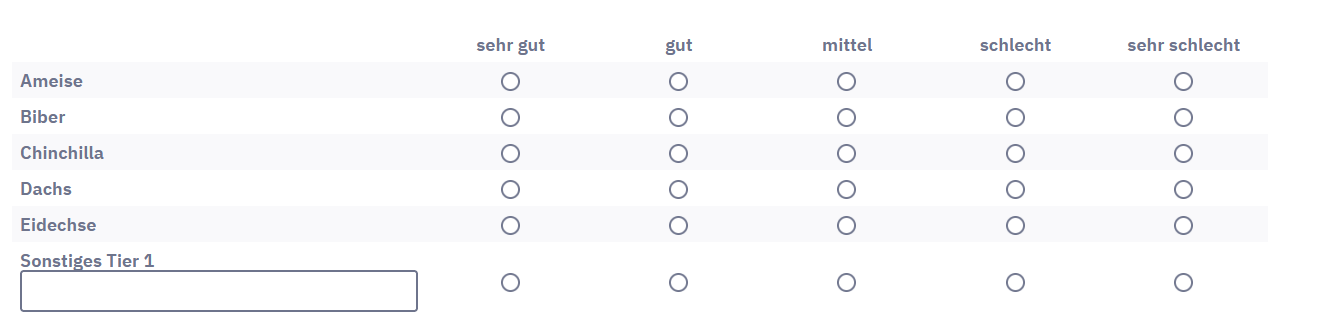
2. Now my opinion about these "Others" in an array question.
Frankly said: It is useless.
Why?
- The items of an array are tested in a pretest for reliability and validity, I hope.
New items are not.
And in many cases you will get "Others" that are already covered by the precoded items.
- These "Others" will be "running lice", meaning the frequency of each will be very low. So the bases are really small and you are not able to calculate any statistical measure nor statistical tests (usually you start here with t-tests or ANOVA)
- If there is a question like "How do you rate ..." and a scale like "excellent - very poor", nobody will enter an "Other" and rate it "very poor". Usualy you will get only new items people like.. This way you get an enormous bias - if you calculate statistical tests.
We always tried to convince our customers to ask this question differently, namely simply in an open-ended additional question "Is there anything else that is important to you / that you prefer / that you ...".
Joffm 





