It's a little more complicated than a wrong IF statement.

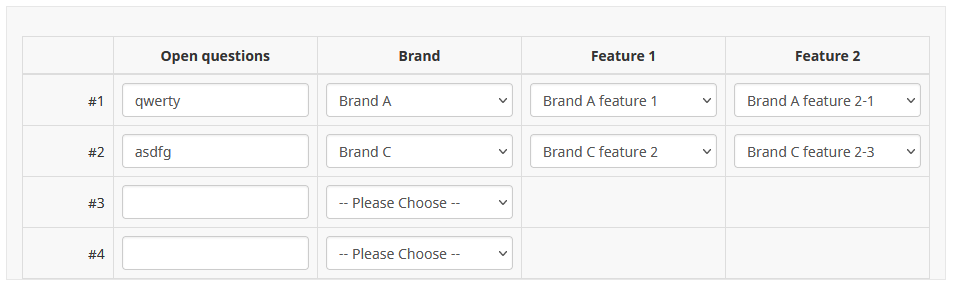
This script, inserted in the question source of an array-texts question, will insert "filter" dropdowns in the second column and dynamically insert dropdowns in the third and fourth columns depending on the answers to those filter dropdowns.
The script is heavily commented so should be easy to follow and should work in LS versions 2-6.
When defining the dropdowns in the "selects" object, the keys (A-3, B-3...) must be combinations of the filter question values and the column positions. For example, a dropdown with key "C-4" will be inserted in column 4 when the filter question is answered as C.
Code:
<script type="text/javascript" data-author="Tony Partner">
$(document).ready(function() {
var thisQuestion = $('#question{QID}');
if($('.inserted-select', thisQuestion).length == 0) {
// Define the dropdowns
// Note: the dynamic dropdown keys should be a combination
// of the filter question values and the column positions
var selects = {
'filter': '<select class="inserted-select form-control">\
<option value="">-- Please Choose --</option>\
<option value="A">Brand A</option>\
<option value="B">Brand B</option>\
<option value="C">Brand C</option>\
</select>',
'A-3': '<select class="inserted-select form-control">\
<option value="">-- Please Choose --</option>\
<option value="A-3-1">Brand A feature 1</option>\
<option value="A-3-2">Brand A feature 2</option>\
<option value="A-3-3">Brand A feature 3</option>\
</select>',
'B-3': '<select class="inserted-select form-control">\
<option value="">-- Please Choose --</option>\
<option value="B-3-1">Brand B feature 1</option>\
<option value="B-3-2">Brand B feature 2</option>\
<option value="B-3-3">Brand B feature 3</option>\
</select>',
'C-3': '<select class="inserted-select form-control">\
<option value="">-- Please Choose --</option>\
<option value="C-3-1">Brand C feature 1</option>\
<option value="C-3-2">Brand C feature 2</option>\
<option value="C-3-3">Brand C feature 3</option>\
</select>',
'A-4': '<select class="inserted-select form-control">\
<option value="">-- Please Choose --</option>\
<option value="A-4-1">Brand A feature 2-1</option>\
<option value="A-4-2">Brand A feature 2-2</option>\
<option value="A-4-3">Brand A feature 2-3</option>\
</select>',
'B-4': '<select class="inserted-select form-control">\
<option value="">-- Please Choose --</option>\
<option value="B-4-1">Brand B feature 2-1</option>\
<option value="B-4-2">Brand B feature 2-2</option>\
<option value="B-4-3">Brand B feature 2-3</option>\
</select>',
'C-4': '<select class="inserted-select form-control">\
<option value="">-- Please Choose --</option>\
<option value="C-4-1">Brand C feature 2-1</option>\
<option value="C-4-2">Brand C feature 2-2</option>\
<option value="C-4-3">Brand C feature 2-3</option>\
</select>'
}
// Some column-specific classes and attributes
$('tr.subquestion-list', thisQuestion).each(function(i) {
$('th, td', this).each(function(i) {
$(this).addClass('column-'+i);
$(this).attr('data-column', i);
});
});
// Add some classes to the dynamic array cells
$('td.column-2', thisQuestion).removeClass('text-item').addClass('filter-cell with-select dropdown-item');
$('td.column-3', thisQuestion).removeClass('text-item').addClass('dynamic-cell with-select dropdown-item');
$('td.column-4', thisQuestion).removeClass('text-item').addClass('dynamic-cell with-select dropdown-item');
// Hide the text inputs (this could be done with CSS)
$('.with-select :text', thisQuestion).hide();
// Insert the filtering dropdown
$('.filter-cell', thisQuestion).addClass('with-select').append(selects['filter']);
// Listeners on the dropdowns
$('.answer-item.with-select', thisQuestion).on('change', '.inserted-select', function(i) {
var thisCell = $(this).closest('.answer-item');
// Set the value of the hidden text input
var newValue = '';
if($(this).val() != '') {
newValue = $(this).val();
}
$('input:text', thisCell).val(newValue).trigger('change');
// Specific to the filter dropdown
if($(this).closest('.answer-item').hasClass('filter-cell')) {
// Handle the dynamic dropdowns
handleChildSelects($(this), true);
}
});
// A function to handle the dynamic dropdowns
function handleChildSelects(el, resetCell) {
var thisRow = $(el).closest('tr');
var filterValue = $(el).val();
// Loop through the dynamic cells in this row
$('.dynamic-cell', thisRow).each(function(i) {
// Define the key for the dynamic dropdown
var selectKey = filterValue+'-'+$(this).attr('data-column');
// Reset this cell if the fiter question has changed
if(resetCell) {
$(':text', this).val('').trigger('change');
$('.inserted-select', this).remove();
}
// Insert the dropdown
$(this).append(selects[selectKey]);
// Set the value of the dropdown
if($(':text:eq(0)', this).val() != '') {
$('.inserted-select', this).val($(':text:eq(0)', this).val());
}
});
}
// Returning to the page
$('.filter-cell', thisQuestion).each(function(i) {
if($(':text:eq(0)', this).val() != '') {
// Set the value of the filter dropdown
$('.inserted-select', this).val($(':text:eq(0)', this).val());
// Handle the dynamic dropdowns
handleChildSelects($('.inserted-select', this), false);
}
});
}
});
</script>
Sample 2.06 survey attached:








