Welcome to the LimeSurvey Community Forum

Ask the community, share ideas, and connect with other LimeSurvey users!

Picking 2 random products

More
6 years 11 months ago #190228 by paulfiner
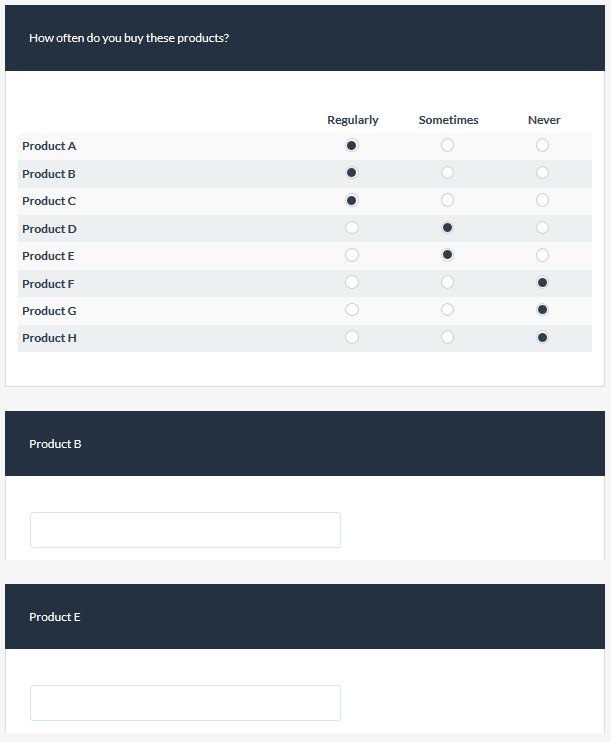
I have an array question with some products where respondents say how often they buy them.
I need to pick 2 random products from all those that they ever buy and ask some questions later in the survey about these. In the attached lss file I have the array question and I managed to create an equation question that shows which products were bought but I can't work out how to pick two from the list and populate the 2 short text fields below.

Limesurvey V2.73.0
The topic has been locked.
More
6 years 11 months ago #190269 by tpartner
Replied by tpartner on topic Picking 2 random products
I don't see any purely Expression Manager solution but you may want to try this JavaScript solution.

1) Directly after the array question, insert a hidden (via CSS) multiple-short-text question with two sub-questions.

2) Place relevance on the two short-text "random product" questions based on the sub-questions of the hidden question so they are only shown if the corresponding sub-question is populated.

3) Pipe text into the two short-text questions from the sub-questions of the hidden question.

4) Place this script in the source of the array question. The script will place a listener on the array and create an array of the labels for all rows with values < 3. This array is then randomized and the first two items are loaded into the sub-questions of the hidden question. This results in those labels being displayed in the text of the two short-text "random product" questions.

Code:
<script type="text/javascript" charset="utf-8"> $(document).on('ready pjax:scriptcomplete',function(){ // Identify the questions var thisQuestion = $('#question{QID}'); var randomProducts = $(thisQuestion).nextAll('.multiple-short-txt:eq(0)'); // Listener on the array $('input:radio', thisQuestion).on('click', function(e) { // Build an array of products var products = []; $('input:radio:checked', thisQuestion).each(function(i) { if($(this).val() < 3) { products.push($.trim($(this).closest('tr').find('.answertext').text())); } }); // Randomize the array shuffleArray(products); // Load the hidden question inputs $('input:text:eq(0)', randomProducts).val(products[0]).trigger('keyup'); $('input:text:eq(1)', randomProducts).val(products[1]).trigger('keyup'); }); }); function shuffleArray(array) { for (var i = array.length - 1; i > 0; i--) { var j = Math.floor(Math.random() * (i + 1)); var temp = array[i]; array[i] = array[j]; array[j] = temp; } return array; } </script>


Sample survey attached:

File Attachment:

File Name: limesurvey...8592.lss
File Size:23.11 KB

Cheers,
Tony Partner

Solutions, code and workarounds presented in these forums are given without any warranty, implied or otherwise.
The topic has been locked.
More
6 years 11 months ago #190271 by paulfiner
Replied by paulfiner on topic Picking 2 random products
Hi Tony,

Thanks for looking into this for me and the lss file, which I will look at shortly.
I did manage to cobble something together myself but it seems to only work some of the time.

Cheers,
Paul
The topic has been locked.
More
6 years 11 months ago #190283 by paulfiner
Replied by paulfiner on topic Picking 2 random products
Hi Tony,

Is it possible to push the row number of the array that was clicked instead of the text?

Cheers,
Paul
The topic has been locked.
More
6 years 10 months ago - 6 years 10 months ago #190292 by tpartner
Replied by tpartner on topic Picking 2 random products
Sure.

Code:
<script type="text/javascript" charset="utf-8"> $(document).on('ready pjax:scriptcomplete',function(){ // Identify the questions var thisQuestion = $('#question{QID}'); var randomProducts = $(thisQuestion).nextAll('.multiple-short-txt:eq(0)'); // Listener on the array $('input:radio', thisQuestion).on('click', function(e) { // Build an array of products var products = []; $('input:radio:checked', thisQuestion).each(function(i) { if($(this).val() < 3) { products.push(($(this).closest('tr').index()+1)); } }); // Randomize the array shuffleArray(products); // Load the hidden question inputs $('input:text:eq(0)', randomProducts).val(products[0]).trigger('keyup'); $('input:text:eq(1)', randomProducts).val(products[1]).trigger('keyup'); }); }); function shuffleArray(array) { for (var i = array.length - 1; i > 0; i--) { var j = Math.floor(Math.random() * (i + 1)); var temp = array[i]; array[i] = array[j]; array[j] = temp; } return array; } </script>

Cheers,
Tony Partner

Solutions, code and workarounds presented in these forums are given without any warranty, implied or otherwise.
Last edit: 6 years 10 months ago by tpartner.
The topic has been locked.
More
6 years 10 months ago #190295 by paulfiner
Replied by paulfiner on topic Picking 2 random products
Awesome! Thanks Tony.
The topic has been locked.
Moderators: tpartnerholch

Lime-years ahead

Online-surveys for every purse and purpose

