Welcome to the LimeSurvey Community Forum

Ask the community, share ideas, and connect with other LimeSurvey users!

Horizontally Aligned Multi-Numeric inputs

More
9 years 3 weeks ago - 9 years 3 weeks ago #158394 by Matadeleo
Hi, I'm trying to change the layout of a specific question (not all questions of the same question-type by editing the base code)
I'm trying to change the input boxes from being vertically aligned, to being horizontally aligned.

Here is how my question currently looks:


Here is an example of what I'm aiming for:


Does anyone have a solution for this? I've attached a survey with the question shown above in it.

File Attachment:

File Name: multinumeric.lss
File Size:15.98 KB
Last edit: 9 years 3 weeks ago by Matadeleo.
The topic has been locked.
More
9 years 3 weeks ago #158400 by tpartner
You could give the question a class "display-horizontal" and add something like this to template.css. But, note that they will wrap on smaller screens.

Code:
.display-horizontal .table-multi-num, .display-horizontal .table-multi-num tbody { display: block; margin: 0; width: 100%; } .display-horizontal .answer-item { padding: 0 !important; } .display-horizontal .answer-item, .display-horizontal .answer-item td { width: auto !important; display: block; float: left; } .display-horizontal .answer-item .col-sm-6 { width: auto; padding-left: 0; } .display-horizontal .answer-item input[type="text"] { width: 50px; }

Cheers,
Tony Partner

Solutions, code and workarounds presented in these forums are given without any warranty, implied or otherwise.
The following user(s) said Thank You: Matadeleo
The topic has been locked.
More
9 years 3 weeks ago #158403 by Joffm
The easiest way out oft the box:
array (numbers)

Regards
Joffm

Volunteers are not paid.
Not because they are worthless, but because they are priceless
The topic has been locked.
More
9 years 3 weeks ago - 9 years 3 weeks ago #158409 by Matadeleo
Thanks tpartner, solution works well as always :)

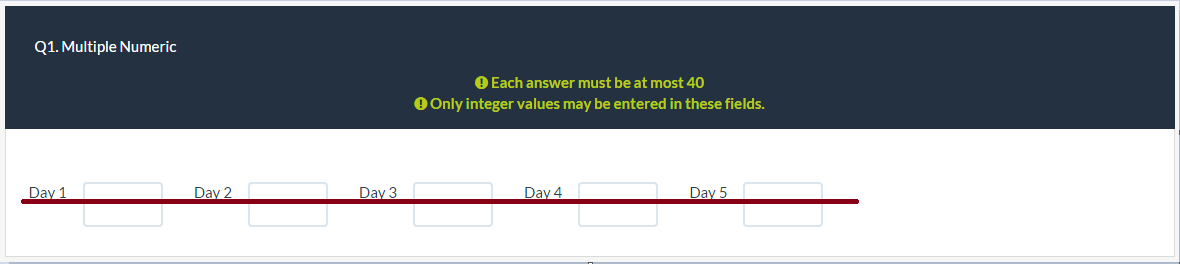
I'm just trying to vertically align the text now so it matches with the input boxes:


I tried to create a css class similar to how you have done yours, and added it to the question but I think I'm doing something wrong.
Code:
.vertalign .control-label .numeric-label { vertical-align: middle; }
Last edit: 9 years 3 weeks ago by Matadeleo.
The topic has been locked.
More
9 years 3 weeks ago #158412 by tpartner
You cannot use vertical-align in inline elements. Try some top margin.

Code:
.vertalign .numeric-label { margin-top: 0.75em; }

Cheers,
Tony Partner

Solutions, code and workarounds presented in these forums are given without any warranty, implied or otherwise.
The topic has been locked.
Moderators: tpartner, holch

Lime-years ahead

Online-surveys for every purse and purpose