

- Posts: 29
- Thank you received: 0


Ask the community, share ideas, and connect with other LimeSurvey users!

 . Enjoy your Sunday.
 tpartner wrote: If both questions are on the same page as your image indicates, add this to the source of the numeric question.
Code:<script type="text/javascript" charset="utf-8"> $(document).ready(function(){ // Identify the questions var q1ID = '{QID}'; var q1 = $('#question'+q1ID+''); var q2 = $(q1).nextAll('.array-multi-flexi-text:eq(0)'); var q2ID = $(q2).attr('id').split('question')[1]; // Initial row handling handleRows($('input[type="text"]', q1)); // Listener on the numeric input $('input[type="text"]', q1).change(function(){ var maxRows = $('tr:[id^="javatbd"]', q2).length; if($(this).val() > maxRows) { alert('You can only display a maximum of '+maxRows+' rows!'); $(this).val(''); } else { handleRows(this); } }); function handleRows(el) { var numRows = $(el).val(); $('tr:[id^="javatbd"]', q2).hide(); $('tr:[id^="javatbd"]', q2).each(function(i){ if(i >= numRows) { $('input[type="text"], select', this).val(''); } else { $(this).show(); } }) } }); </script>
Here's a sample survey:


ricardo wrote: Hi Tony,
There small glitch in this workaround
The rows don't display as soon as the number is entered...they only show up after clicking somewhere else...is there a way to make the rows appear as soon as the number is entered.
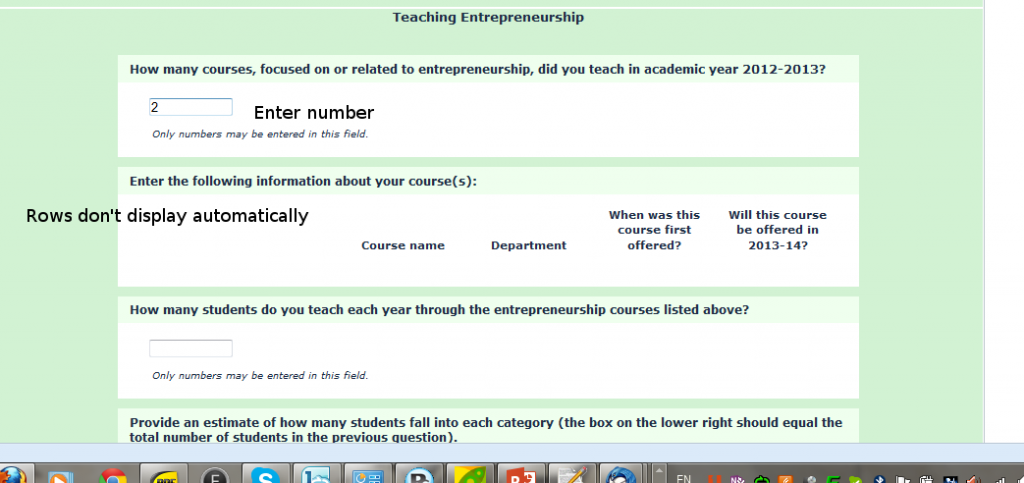
this is a link to the question broaderimpacts.org/surveys/limesurvey/index.php/289571/lang-en
rg